




September 18, 2025

September 10, 2025
July 3, 2025
January 10, 2025
How to Link PAN With Aadhaar Online: Online Process, Fees & Status Check

Author
Shoonya Team
In the last few months, thousands of taxpayers have received reminders from banks, brokers, and even the Income Tax Department urging them to link PAN with Aadhaar before the new 31 December 2025 deadline. Many discovered that their PAN had been marked “inoperative” only when their mutual fund transactions failed, or their e-KYC was rejected.
To prevent this last-minute rush, it’s essential to understand exactly how to link PAN with Aadhaar, what fees apply, and how to check if your PAN is already linked.
Let’s begin!
Eligibility & Key Requirements Before Linking PAN With Aadhaar
Before you start the linking process, keep these points in mind:
- Your PAN must be active (not already inoperative).
- Your Aadhaar must be valid with correct demographic details.
- Your mobile number must be linked with Aadhaar to receive OTP.
- Ensure that your name, DOB, and gender match on both documents.
- A late fee of ₹1,000 must be paid (if linking after the deadline).
Once you have these ready, you can proceed to link PAN with Aadhaar online.
PAN – Aadhaar Link Last Date
As per the latest guidelines, taxpayers must link their PAN with Aadhaar before the extended deadline to avoid penalties and disruption in financial services.
| Notification | Details |
| Deadline | 31 December 2025 |
| Penalty Fee | ₹1,000 |
| Consequence | PAN becomes Inactive (Closed) |
| Impact Date | From 1 January 2026 |
| Main Exemption | Citizens above 80 years (Super Senior) |
How to Link PAN With Aadhaar Online (Step-by-Step)
Follow these steps on the official Income Tax e-Filing portal:
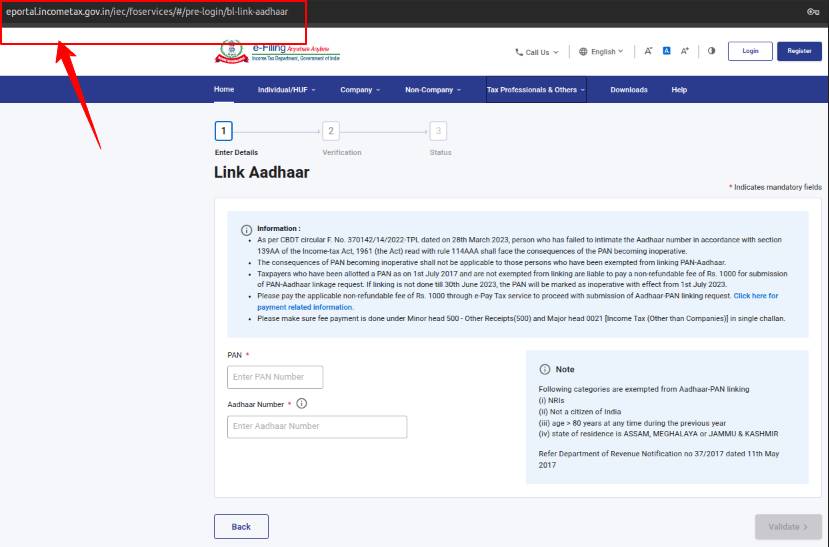
Step 1: Visit the Linking Page
Go to the ‘Link Aadhaar’ service page on the Income Tax website.
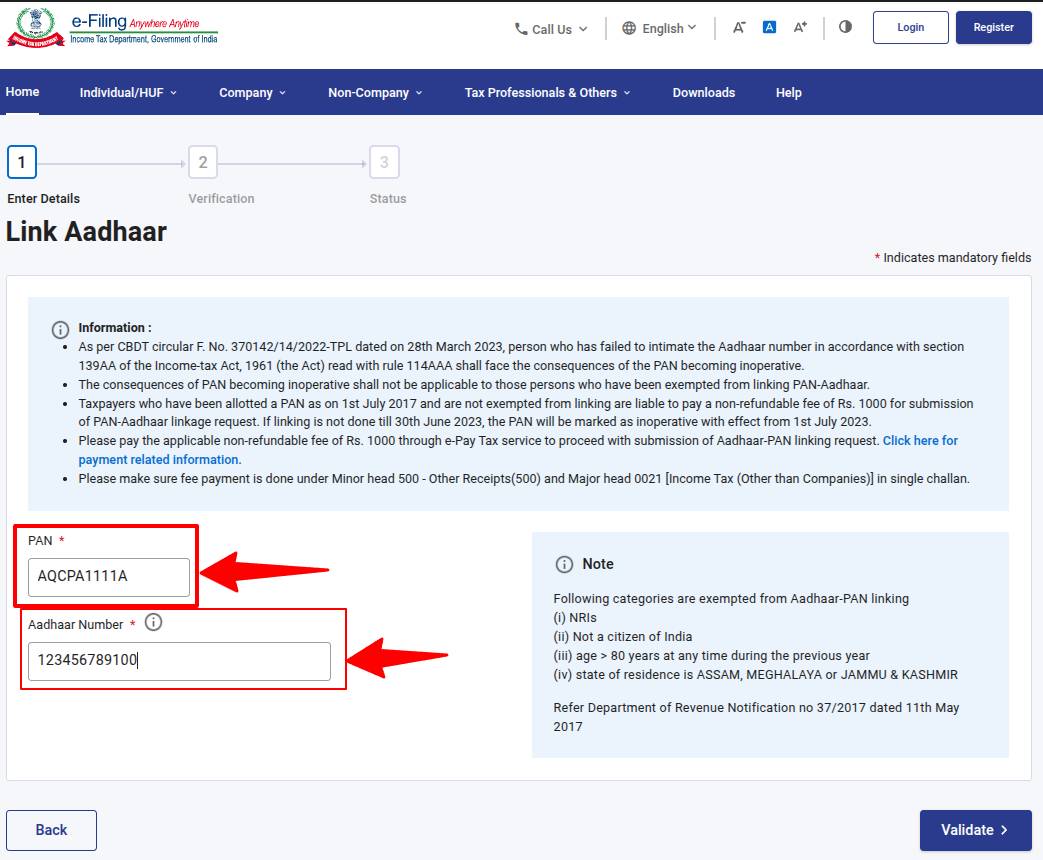
Step 2: Enter Your Details
Fill in the following information:
- PAN
- Aadhaar Number
Note: In case your PAN is already linked, you will receive a pop-up message as shown in the screenshot below.
- Enter your Name and Mobile Number.
- Tick the “I agree to validate my Aadhaar details” option.
Additional Step: Pay the Linking Fee (₹1,000) if LATE
Before completing the linking process, taxpayers must pay a mandatory fee of ₹1,000 after the deadline as per the Income Tax Department’s latest rules.
The fee must be paid before submitting the linking request.
Payment is done only through the e-Pay Tax service on the Income Tax portal.
Choose:
- Proceed → Income Tax → AY 202_–2_ → Other Receipts
Note: You can pay using net banking, debit card, UPI, NEFT/RTGS, or authorised bank options
After successful payment, revisit the Aadhaar–PAN linking page.
Step 3: Verify With OTP
You’ll receive an OTP on your Aadhaar-linked mobile number.
Enter it to validate and submit the request.
Step 4: Confirmation
Once the verification is complete, you’ll see a message stating that your Aadhaar–PAN linking request has been submitted.
How to Check Aadhaar – PAN Link Status
Once you’ve submitted the linking request, you can easily verify whether your PAN and Aadhaar are successfully linked. Follow the steps below:
Method 1: Check Status on the Income Tax Portal
Step 1: Visit the Aadhaar–PAN Status page on the Income Tax website.
Step 2: Enter your deatils like PAN and Aadhaar Number.
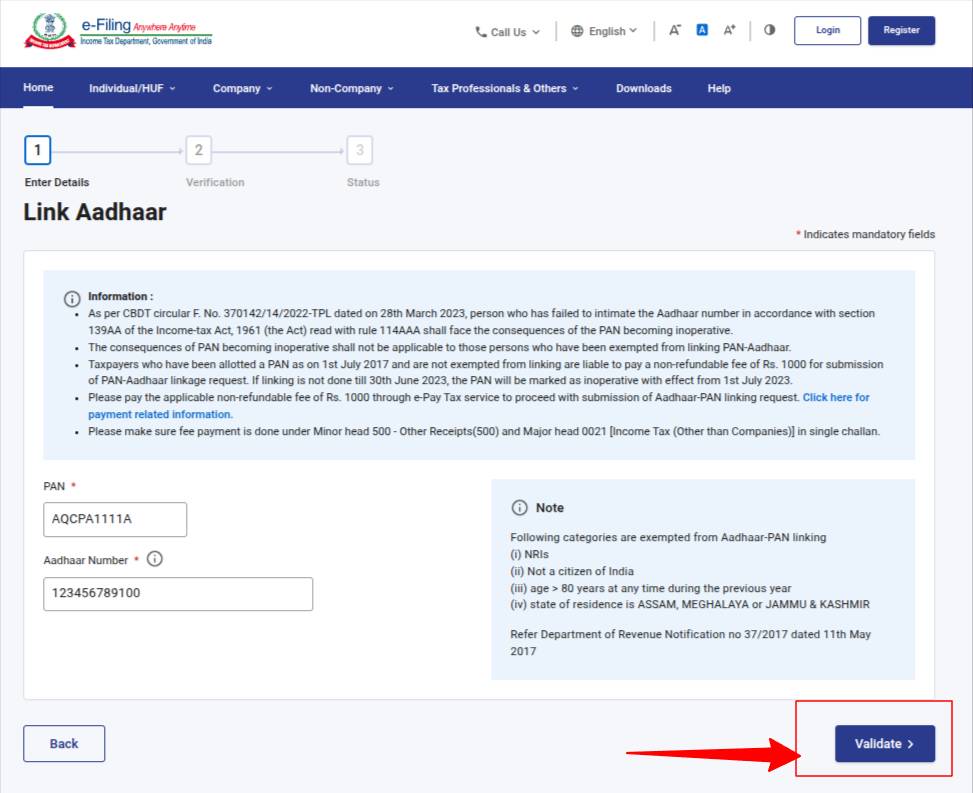
Step 3: Click on “Validate Button“.
You will see one of the following messages:
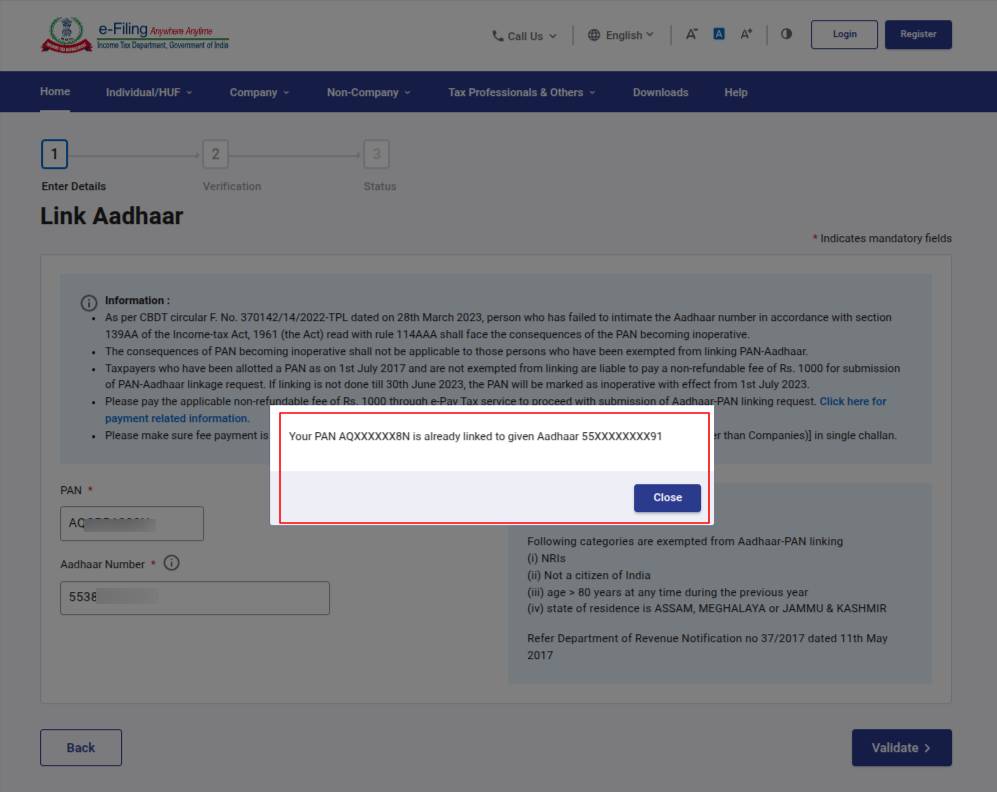
- “Aadhaar is already linked with PAN.”
- “Your request is under processing.”
- “Aadhaar–PAN is not linked.”
Need to update your Aadhaar details? Learn how to link Aadhaar with mobile number.
Method 2: Use the Quick Link Option (No Login Needed)
Step 1: On the Income Tax homepage, go to Quick Links → Link Aadhaar Status.
Step 2: Enter your PAN and Aadhaar.
Step 3: Submit to view real-time status.
How to Link PAN With Aadhar via SMS
If you prefer not to use the online portal, you can link your PAN and Aadhaar using a simple SMS format (available only if your details already match on both documents).
SMS Format
Send the below message to 567678 or 56161:
UIDPAN <space> Aadhaar Number <space> PAN
Example: UIDPAN 123456789012 ABCDE1234F
After You Send the PAN – Aadhaar Link SMS
- If the details match, your request will be registered.
- You will receive an SMS confirmation once the linking is successful.
- If there is a mismatch in name, date of birth, or gender, the SMS request will not go through, and you must use the online method.
What are the Benefits of Linking PAN With Aadhaar
Linking your PAN and Aadhaar helps streamline your financial profile and ensures smoother transactions across systems.
- Prevents PAN from becoming inactive: Keeps your PAN operational for all tax and financial activities.
- Faster Income Tax Filing: Aadhaar-based OTP simplifies login and e-verification.
- Avoids Penalties and Delays: Timely linking saves you from additional compliance issues.
- Reduces Duplicate PAN Issues: Helps the Income Tax Department detect and remove multiple PANs held by an individual.
- Smooth Banking & Investments: Required for opening bank accounts, mutual funds, stock trading, and high-value transactions.
- Ensures Updated KYC: Most financial institutions require PAN–Aadhaar linking for KYC verification.
Consequences of Not Linking PAN With Aadhaar
If you do not link your PAN with Aadhaar by 31 December 2025, your PAN will be marked inactive from 1 January 2026.
Here is what that means:
- Cannot File Income Tax Returns: E-filing and processing of ITR will not be allowed.
- TDS/TCS Deductions at Higher Rates: Applicable under Section 206AA and 206CC if your PAN is inoperative.
- No Access to Banking & Investment Services: Opening bank accounts, trading, mutual funds, and deposits may get blocked or delayed.
- KYC Failures: Many institutions will not accept incomplete KYC without a valid, active PAN.
- Refund Delays & Processing Issues: Income tax refunds will be held until PAN is activated through linking.
- Restriction in Transactions: High-value transactions requiring PAN (property sale, investments, etc.) cannot be completed.
Final Thought
Linking your PAN with Aadhaar is an essential compliance step that protects your financial access and ensures smooth functioning across tax, banking, and investment services. Whether you choose the online method, SMS option, or need to check your linking status, take a few minutes now to ensure seamless financial operations later.
Learn More About Your Aadhaar Card PDF Password
How to Link PAN With Aadhaar | FAQs
Yes. The government has made PAN–Aadhaar linking mandatory. If you don’t link them by 31 December 2025, your PAN will become inactive from 1 January 2026.
Super senior citizens (80+ years) are exempt.
You can check the status on the Income Tax portal using the “Link Aadhaar Status” service under Quick Links. Enter your PAN and Aadhaar to view your status instantly.
Your PAN will be marked inactive, affecting income tax filing, banking, KYC, mutual fund transactions, and high-value financial activities.
No. The portal will not allow you to file your ITR if your PAN is inactive or not linked to Aadhaar.
Linking is only for verification and preventing duplicate PANs. Your biometric data is not shared with the Income Tax Department.
Source: https://www.incometax.gov.in/
Disclaimer: Investments in the securities market are subject to market risks; read all the related documents carefully before investing.


Explore Our Offerings

Stocks
Trade equities across NSE and BSE with zero delivery charges. Invest, hold or sell with a seamless experience.


Future & Options
Execute complex strategies with simple tools and real-time data.

IPOs
Apply to the latest IPOs in just a few taps. Stay updated and capture opportunities as they open.